WebBingoMaker

I use WebBingoMaker to turn a familiar word list into a shared classroom activity. I want the first impression to be simple: this is a classroom game starter, not another complicated platform. The promise is right there on the slide. Paste your terms, generate a card, and share one link with the class. That matters because teachers do not need another tool that takes longer to prepare than the activity itself. Here, the starting point is a list of words or concepts you already have. The next slide pulls that idea into the everyday classroom problem this tool solves.
Bring the content you already use
- Paste one term per line
- Import CSV, text, or Markdown
- Try a subject and grade-band bank
You can edit the terms before you generate a game.
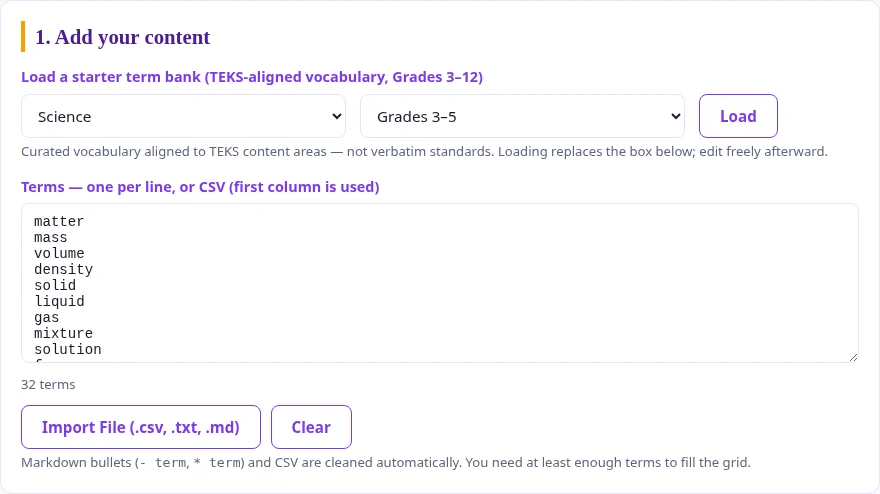
Here, I am focusing on input. Teachers can paste terms one per line, or use a file such as CSV, TXT, or Markdown. That is more useful than it may sound, because classroom content lives in odd places: copied from a document, exported from a spreadsheet, or gathered from notes. The game provides Markdown bullets and CSV are cleaned automatically, with the first column used for CSV. That helps keep the tool forgiving. You do not need to format everything perfectly before you start. The next slide moves from the content list to the game choices.
Match the grid to your time
- Three by three for a quick round
- Four by four for more variety
- Five by five for classic bingo
Choose a winning pattern and an optional free center on five-by-five cards.
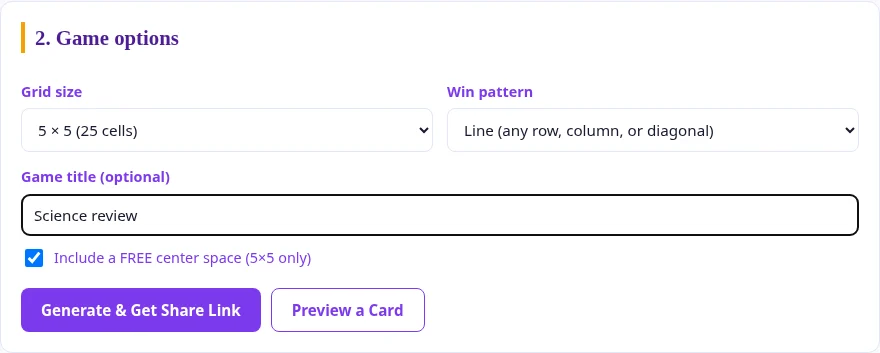
I choose the grid that fits the time available. WebBingoMaker gives you three grid sizes: three by three, four by four, and five by five. That matters because not every class activity needs a full classic bingo card. A short vocabulary warm-up might only need nine cells. A larger review before a test might call for the full twenty-five-cell version with a FREE center space. I like that the choices are simple. You are not designing a game system. You are picking the size that matches the time and purpose. Next, I show what happens after students open the link.
One link. A card for each learner.
- Copy the generated link
- Post it in your LMS or class chat
- Students tap matching squares
The link carries the terms and game options. Students do not need accounts.
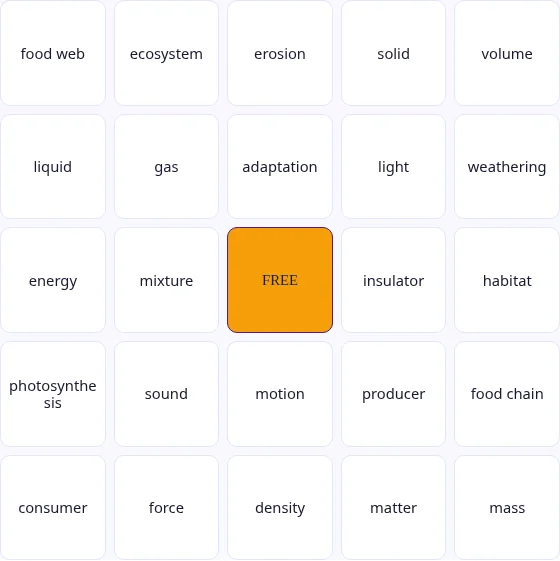
I share one link with everyone. The vocabulary and game choices travel inside that link, and each participant gets a randomized arrangement. The class uses the same content without needing identical cards. Students can tap squares as I call clues, print a card, or request a new random card. I explain the winning pattern before we begin so everyone knows what to look for. There is no account setup or live teacher dashboard to manage. I still lead the clues and check a claimed bingo with the student. Next, I will connect that simple workflow to a few familiar classroom activities.
A link or an embedded game
- Copy the class link
- Or paste the embed code into Google Sites
- Keep the same classroom vocabulary
The language switcher changes the interface. Your terms stay as you wrote them.

I can share the generated link anywhere students already find their class materials. If I use Google Sites, I can copy the embed code and place the same game inside a page. I test the published page before class so I know it opens where I expect. The language switcher changes the interface without translating or replacing my vocabulary. That lets me keep subject-specific terms in the language I am teaching. I also remind students that opening the link creates a randomized card; it is not a teacher-controlled live room. We can now make one small game and try a round together.
Make tomorrow’s terms playable.
I would keep the first attempt small. I would not start by building a giant review game for an entire semester. I would start with tomorrow’s terms: at least nine terms for a small grid, sixteen for a medium grid, or twenty-four with a free center from the current lesson. Paste them in, generate the card, and share the link. After that first round, it becomes easier to see where the tool belongs in your routine. We can give students a quick, shared way to rehearse the language and ideas they need to remember.